Networking 0x100 - IP Addressing and Subnets
Internet Protocol (IP) addressing is one of those topics that seems simple on the surface but has a surprising amount of depth. Every device on a network needs an address, and the way those addresses are structured, divided, and managed is what makes modern networking possible — from your home Wi-Fi to the entire internet.
In this post, we’re going to build up the concept from scratch. Why do we even need addresses? Why binary? How do subnet masks work? How do you calculate how many hosts fit in a network? By the end, you’ll have a solid understanding of IPv4 addressing, subnetting, and the related concepts that tie it all together.
Why Do We Need IP Addresses?
Let’s start with the basics. Consider a simple network of computers:
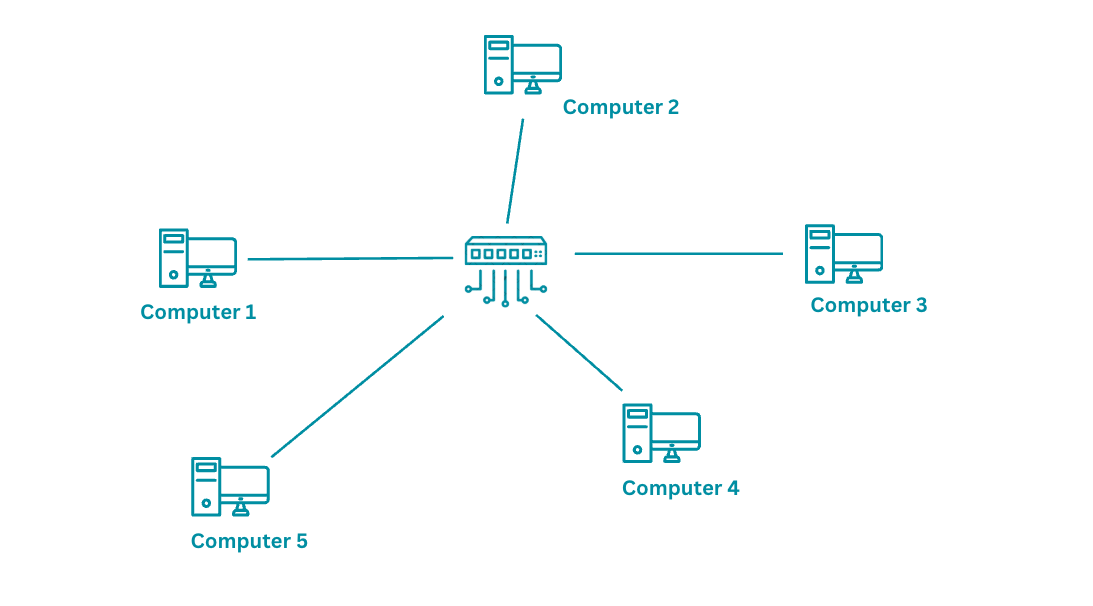
Computer 1 wants to send a message to Computer 4. For this to work:
- Each device needs a unique identifier so messages can be routed correctly
- The central device (a router or switch) must know where to forward the message
- When the message arrives, Computer 4 needs to know where it came from so it can reply
Without unique addresses, the network has no way to distinguish one device from another. It would be like sending a letter with no address on the envelope.
From Names to Numbers
We could assign each computer a name — “Computer 1”, “Computer 2”, etc. But here’s the problem: names are variable-length strings that are expensive for hardware to process. A router forwarding millions of packets per second can’t afford to compare strings like “Computer 1” and “Computer 14” character by character.
What networking hardware needs is something fixed-length, compact, and fast to compare. That means numbers. Specifically, binary numbers.
A 32-bit binary address like this:
10110101010100101010101010101011
gives us 2^32 = 4,294,967,296 unique addresses — over 4 billion. Each address is exactly 32 bits, stored neatly in a CPU register, and compared in a single clock cycle. Perfect for machines.
But for humans? Not so much. Even converting to decimal gives us:
3042093739
“Hey, connect to 3042093739!” “Wait… was that 3-0-4 or 3-0-9?”
We needed a middle ground — something machines can process efficiently but humans can actually read and remember.
Dotted Decimal Notation
The solution is dotted decimal notation. Take the 32-bit binary number, split it into four 8-bit chunks called octets, and convert each to decimal:
10110101 . 01010010 . 10101010 . 10101011
   181    .    82    .   170    .   171
Result: 181.82.170.171
Each octet ranges from 0 to 255 (since 8 bits can represent 2^8 = 256 values). This gives us a format that’s compact enough to remember, structured enough to work with, and directly maps to the underlying binary.
Now let’s give addresses to our network:
Computer 1 → 181.82.170.0
Computer 2 → 181.82.170.1
Computer 3 → 181.82.170.2
Computer 4 → 181.82.170.3
Computer 5 → 181.82.170.4

This works beautifully for a local network. The addresses follow a predictable pattern, and the first three octets (181.82.170) identify the network while the last octet identifies each device.
But what happens when we scale this to the internet?
The Internet Problem
On a small local network, you can assign addresses manually. On the internet — a shared network connecting billions of devices across millions of organizations — you need structure.
Without structure:
- Address conflicts — Two companies could accidentally use the same IP range
- Address waste — Without planning, the 4.3 billion IPv4 addresses get consumed inefficiently
- Routing chaos — If every address is random, routers would need to store billions of individual entries
The solution is to divide every IP address into two parts:
[ Network Part ] [ Host Part ]
- Network part — Identifies which network (organization, campus, ISP)
- Host part — Identifies which specific device within that network
10110101.01010010 | 10101010.00000000
   Network ID     |    Host ID
   (181.82)       |   (170.0)
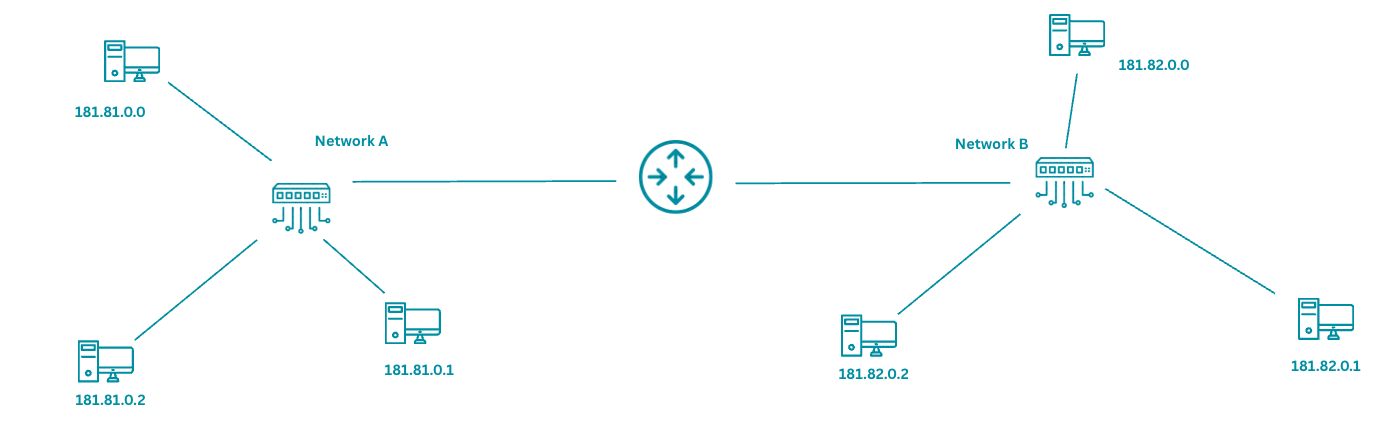
Now a router on the internet doesn’t need to know about every individual device. It just needs to know: “All addresses starting with 181.82 belong to Organization X — send the packet that way.” This is what makes global routing scalable.
But how does a device know where the network part ends and the host part begins? That’s where the subnet mask comes in.
The Subnet Mask
A subnet mask is a 32-bit number that tells you which bits of an IP address belong to the network and which belong to the host.
IP Address:     192.168.1.10
Subnet Mask:    255.255.255.0
In binary:
IP Address:     11000000.10101000.00000001.00001010
Subnet Mask:    11111111.11111111.11111111.00000000
                ^^^^^^^^ ^^^^^^^^ ^^^^^^^^ --------
                Network  Network  Network   Host
The rule is simple:
- Where the mask has 1s → that’s the network portion
- Where the mask has 0s → that’s the host portion
So for 192.168.1.10 with mask 255.255.255.0:
- Network address:
192.168.1.0 - Host part:
10(this specific device) - All devices on this network share the prefix
192.168.1.x
How to Calculate the Network Address
To find the network address, perform a bitwise AND between the IP and the mask:
IP:     11000000.10101000.00000001.00001010   (192.168.1.10)
Mask:   11111111.11111111.11111111.00000000   (255.255.255.0)
AND:    11000000.10101000.00000001.00000000   (192.168.1.0)
The result — 192.168.1.0 — is the network address. Any device with an IP that produces the same network address (after AND-ing with the mask) is on the same network.
Common Subnet Masks
| Mask | Binary | Network Bits | Host Bits | Hosts per Network |
|---|---|---|---|---|
| 255.0.0.0 | 11111111.00000000.00000000.00000000 | 8 | 24 | 16,777,214 |
| 255.255.0.0 | 11111111.11111111.00000000.00000000 | 16 | 16 | 65,534 |
| 255.255.255.0 | 11111111.11111111.11111111.00000000 | 24 | 8 | 254 |
| 255.255.255.128 | 11111111.11111111.11111111.10000000 | 25 | 7 | 126 |
| 255.255.255.192 | 11111111.11111111.11111111.11000000 | 26 | 6 | 62 |
| 255.255.255.224 | 11111111.11111111.11111111.11100000 | 27 | 5 | 30 |
| 255.255.255.240 | 11111111.11111111.11111111.11110000 | 28 | 4 | 14 |
| 255.255.255.252 | 11111111.11111111.11111111.11111100 | 30 | 2 | 2 |
Why is the host count always 2 less than 2^n? Because two addresses in every network are reserved: the network address (all host bits = 0) and the broadcast address (all host bits = 1).
CIDR Notation
Writing 255.255.255.0 every time is tedious. CIDR (Classless Inter-Domain Routing) notation gives us a shorthand. Instead of writing the full mask, we just write how many bits are in the network portion:
192.168.1.0 / 255.255.255.0 → 192.168.1.0/24
The /24 means “the first 24 bits are the network part.” Since an IPv4 address is 32 bits, that leaves 32 - 24 = 8 bits for hosts.
Some common CIDR notations:
| CIDR | Subnet Mask | Network Bits | Usable Hosts |
|---|---|---|---|
| /8 | 255.0.0.0 | 8 | 16,777,214 |
| /16 | 255.255.0.0 | 16 | 65,534 |
| /24 | 255.255.255.0 | 24 | 254 |
| /25 | 255.255.255.128 | 25 | 126 |
| /26 | 255.255.255.192 | 26 | 62 |
| /27 | 255.255.255.224 | 27 | 30 |
| /28 | 255.255.255.240 | 28 | 14 |
| /30 | 255.255.255.252 | 30 | 2 |
| /32 | 255.255.255.255 | 32 | 1 (single host) |
A /30 with only 2 usable hosts is commonly used for point-to-point links between two routers — they only need 2 addresses.
IP Address Classes — The Old Way
Before CIDR, the internet used a classful addressing system. The first few bits of an IP address determined which class it belonged to, and the class determined the default subnet mask.
| Class | First Bits | First Octet Range | Default Mask | Networks | Hosts per Network |
|---|---|---|---|---|---|
| A | 0… | 1–126 | /8 (255.0.0.0) | 126 | 16,777,214 |
| B | 10… | 128–191 | /16 (255.255.0.0) | 16,384 | 65,534 |
| C | 110… | 192–223 | /24 (255.255.255.0) | 2,097,152 | 254 |
| D | 1110… | 224–239 | — (Multicast) | — | — |
| E | 1111… | 240–255 | — (Reserved) | — | — |
The problem with classful addressing was the massive gap between classes. If you needed 300 hosts, a Class C (/24, 254 hosts) was too small, but a Class B (/16, 65,534 hosts) wasted over 65,000 addresses. This wasteful allocation is what drove the switch to CIDR, which lets you use any prefix length — /25, /26, /27 — whatever fits your actual needs.
You’ll still hear people say “Class C network” when they mean a /24. Technically classful addressing is obsolete, but the terminology persists.
Special IP Addresses
Not every IP address is assigned to a regular device. Several ranges have special purposes.
Private IP Ranges (RFC 1918)
These addresses are reserved for use within local networks and cannot be routed on the public internet:
| Range | CIDR | Class | Typical Use |
|---|---|---|---|
| 10.0.0.0 – 10.255.255.255 | 10.0.0.0/8 | A | Large enterprises, cloud VPCs |
| 172.16.0.0 – 172.31.255.255 | 172.16.0.0/12 | B | Medium networks |
| 192.168.0.0 – 192.168.255.255 | 192.168.0.0/16 | C | Home and small office networks |
If you open your terminal right now, your IP is almost certainly in one of these ranges:
$ ip addr show | grep "inet "
    inet 127.0.0.1/8 scope host lo
    inet 192.168.1.42/24 brd 192.168.1.255 scope global en0
192.168.1.42 — that’s a private address. Your router translates it to a public address before packets leave your network. More on that in the NAT section.
Other Special Addresses
| Address/Range | Purpose |
|---|---|
| 127.0.0.0/8 | Loopback — 127.0.0.1 (localhost) refers to your own machine |
| 0.0.0.0 | Default route or “any address” — used in routing tables and server bindings |
| 255.255.255.255 | Limited broadcast — sends to all devices on the local network |
| 169.254.0.0/16 | Link-local — auto-assigned when DHCP fails (APIPA) |
Subnetting — Dividing Networks
Subnetting is the practice of taking a network and dividing it into smaller sub-networks. Why would you want to?
- Organization — Put the engineering team on one subnet, HR on another, servers on a third
- Security — Subnets can have different firewall rules. A breach in one subnet doesn’t automatically mean access to another
- Performance — Smaller broadcast domains mean less broadcast traffic
- Efficient address use — Allocate only as many addresses as each department needs
A Worked Example
Your company is assigned the network 192.168.10.0/24. That gives you 254 usable host addresses (192.168.10.1 through 192.168.10.254). You need to divide it into 4 subnets for 4 departments.
Step 1: How many bits do we need to borrow?
We need 4 subnets. 2^2 = 4, so we borrow 2 bits from the host portion.
Original mask: /24 (24 network bits, 8 host bits)
New mask: /26 (24 + 2 = 26 network bits, 6 host bits)
Step 2: Calculate the subnets
With a /26 mask, the last octet is divided as: XX | HHHHHH (2 subnet bits, 6 host bits)
The four combinations of the 2 subnet bits (00, 01, 10, 11) give us:
| Subnet | Network Address | First Usable | Last Usable | Broadcast | Hosts |
|---|---|---|---|---|---|
| 1 | 192.168.10.0/26 | 192.168.10.1 | 192.168.10.62 | 192.168.10.63 | 62 |
| 2 | 192.168.10.64/26 | 192.168.10.65 | 192.168.10.126 | 192.168.10.127 | 62 |
| 3 | 192.168.10.128/26 | 192.168.10.129 | 192.168.10.190 | 192.168.10.191 | 62 |
| 4 | 192.168.10.192/26 | 192.168.10.193 | 192.168.10.254 | 192.168.10.255 | 62 |
Each subnet has 2^6 - 2 = 62 usable host addresses. Total: 4 × 62 = 248 usable addresses from the original 254.
Step 3: Assign them
Engineering:  192.168.10.0/26    (192.168.10.1 – 192.168.10.62)
HR:           192.168.10.64/26   (192.168.10.65 – 192.168.10.126)
Servers:      192.168.10.128/26  (192.168.10.129 – 192.168.10.190)
Management:   192.168.10.192/26  (192.168.10.193 – 192.168.10.254)
Now each department has its own address range, and a router between them controls which subnets can communicate with which.
The Quick Math
Here’s a formula you’ll use constantly:
Number of subnets = 2^(borrowed bits)
Hosts per subnet = 2^(remaining host bits) - 2
Block size = 256 - (value of the last octet of the subnet mask)
For a /26 mask:
- Subnet mask last octet: 256 - 192 = 64 (block size)
- Subnets start at: 0, 64, 128, 192 (incrementing by the block size)
- Hosts per subnet: 2^6 - 2 = 62
This block size trick is the fastest way to calculate subnets in your head.
Variable Length Subnet Masking (VLSM)
In the example above, we gave every department 62 addresses. But what if Engineering has 50 people, HR has 20, and the server room only has 10 machines? You’re wasting addresses.
VLSM lets you use different subnet sizes for different needs:
Engineering (50 hosts):  192.168.10.0/26    → 62 usable addresses ✓
HR (20 hosts):           192.168.10.64/27   → 30 usable addresses ✓
Servers (10 hosts):      192.168.10.96/28   → 14 usable addresses ✓
Management (5 hosts):    192.168.10.112/29  → 6 usable addresses  ✓
The key rule: start with the largest subnet first to avoid overlapping address ranges. VLSM is how real-world networks are designed — you allocate exactly what each segment needs, nothing more.
NAT — How Private Networks Reach the Internet
We said earlier that private IP addresses (192.168.x.x, 10.x.x, 172.16-31.x.x) can’t be routed on the public internet. So how does your computer with the address 192.168.1.42 actually reach google.com?
The answer is Network Address Translation (NAT).
Your router sits between your private network and the public internet. It has two IP addresses — a private one facing inward (e.g., 192.168.1.1) and a public one facing outward (e.g., 203.0.113.50, assigned by your ISP).
When your computer sends a packet to the internet:
1. Your PC sends:
   Source: 192.168.1.42:54321 → Destination: 142.250.80.46:443 (google.com)

2. Your router rewrites the source address:
   Source: 203.0.113.50:54321 → Destination: 142.250.80.46:443

3. Google's response comes back:
   Source: 142.250.80.46:443 → Destination: 203.0.113.50:54321

4. Your router translates back:
   Source: 142.250.80.46:443 → Destination: 192.168.1.42:54321
The router maintains a NAT table that maps internal addresses/ports to external addresses/ports. This is how dozens or even hundreds of devices in your home or office can share a single public IP address.
Types of NAT
| Type | Description | Use Case |
|---|---|---|
| Static NAT | One-to-one mapping (1 private IP ↔ 1 public IP) | Servers that need a fixed public IP |
| Dynamic NAT | Maps private IPs to a pool of public IPs | Organizations with a small block of public IPs |
| PAT (Port Address Translation) | Many-to-one — multiple private IPs share one public IP using different port numbers | Home routers, most common type |
PAT (also called NAT overload) is what your home router does. It’s the reason IPv4 hasn’t completely run out of addresses yet — millions of devices hide behind a relatively small number of public IPs.
Putting It All Together — A Practical Example
Let’s say you check your network configuration:
$ ifconfig en0
en0: flags=8863<UP,BROADCAST,RUNNING,SIMPLEX,MULTICAST>
    inet 192.168.1.42 netmask 0xffffff00 broadcast 192.168.1.255
Or on Linux:
$ ip addr show eth0
    inet 192.168.1.42/24 brd 192.168.1.255 scope global eth0
From this we can calculate everything:
IP Address:         192.168.1.42
Subnet Mask:        255.255.255.0 (/24)
Network Address:    192.168.1.0     (first address — all host bits 0)
Broadcast Address:  192.168.1.255   (last address — all host bits 1)
First Usable Host:  192.168.1.1     (usually the default gateway/router)
Last Usable Host:   192.168.1.254
Total Usable Hosts: 254
You can verify the default gateway:
$ ip route | grep default
default via 192.168.1.1 dev eth0

$ ping 192.168.1.1
PING 192.168.1.1: 64 bytes from 192.168.1.1: icmp_seq=0 time=1.234 ms
That 192.168.1.1 is your router — the device doing NAT to connect your private network to the internet.
A Quick Note on IPv6
Everything we’ve discussed so far is IPv4 — the 32-bit addressing system. With 4.3 billion addresses, it seemed like enough in the 1980s. It’s not anymore.
IPv6 uses 128-bit addresses, giving us 2^128 = 340 undecillion addresses. That’s roughly 340,000,000,000,000,000,000,000,000,000,000,000,000. Enough for every grain of sand on Earth to have its own IP address.
IPv6 addresses look like this:
2001:0db8:85a3:0000:0000:8a2e:0370:7334
Eight groups of four hex digits, separated by colons. Leading zeros can be omitted, and consecutive groups of all zeros can be replaced with :::
2001:db8:85a3::8a2e:370:7334
IPv6 is its own deep topic, but the core concepts — network/host portions, prefix lengths, subnetting — carry over directly. A /64 in IPv6 means the first 64 bits are the network prefix, just like a /24 in IPv4 means the first 24 bits are the network prefix.
The internet is gradually transitioning from IPv4 to IPv6, but it’s a slow process. Most networks today run dual-stack — supporting both protocols simultaneously.
Summary — The Key Formulas
Here’s a cheat sheet for quick reference:
Total addresses in a network     = 2^(host bits)
Usable host addresses            = 2^(host bits) - 2
Host bits                        = 32 - prefix length
Block size (last octet)          = 256 - subnet mask last octet
Number of subnets                = 2^(borrowed bits)

Network address                  = IP AND subnet mask
Broadcast address                = Network address OR (NOT subnet mask)
First usable host                = Network address + 1
Last usable host                 = Broadcast address - 1
Final Thoughts
IP addressing might seem like dry theory, but it’s the foundation that everything else in networking sits on. Routing, firewalls, VPNs, load balancers, DNS — they all depend on a solid understanding of how addresses and subnets work.
The key concepts to internalize:
- Every IP address has a network part and a host part, separated by the subnet mask
- The subnet mask (or CIDR prefix) tells you how many devices can exist on a network
- Subnetting lets you divide large networks into smaller, manageable segments
- Private addresses + NAT is what keeps IPv4 alive despite address exhaustion
- When in doubt, convert to binary — the math always makes sense in binary
If you’re studying for a networking certification or just trying to understand how the internet works under the hood, these fundamentals will serve you well. Everything else — routing protocols, VLANs, DHCP, DNS — builds directly on top of what we covered here.
Keep learning, keep building.










